 Prompt Inspector
Inspect before you send.
Prompt Inspector finds names, contact details, health information and API keys in your text, hides them behind placeholders, and puts your real details back when the AI answers. It runs on your device.
Free to start. Pro is a one-time purchase. Works with ChatGPT, Claude, Gemini and any other AI chat.
Hi, I’m Maria Lopez ([email protected], 617-555-0148). I take metformin 500 mg for type 2 diabetes. My rent at 4827 Maplewood Drive, Boston, MA 02118 is $2,800 a month. Can you draft a message asking my landlord to talk about it?
Dear Property Manager, I’m Maria Lopez, a tenant at 4827 Maplewood Drive, Boston, MA 02118. I’d like to talk about the recent increase to my $2,800 rent. You can reach me at [email protected] or 617-555-0148.
Four steps, about ten seconds
Prompt Inspector opens in Chrome’s side panel and stays beside your chat while you work.
Paste
Drop in the text, email, log or config you’re about to share with an AI.
Inspect
Everything sensitive is found on your device and swapped for placeholders like [PERSON_1].
Copy into the AI
Paste the cleaned text into ChatGPT, Claude, Gemini or any other tool.
Restore
Paste the answer back. Your real details return, highlighted, with formatting kept.
Hide who you are. Keep what the AI needs.
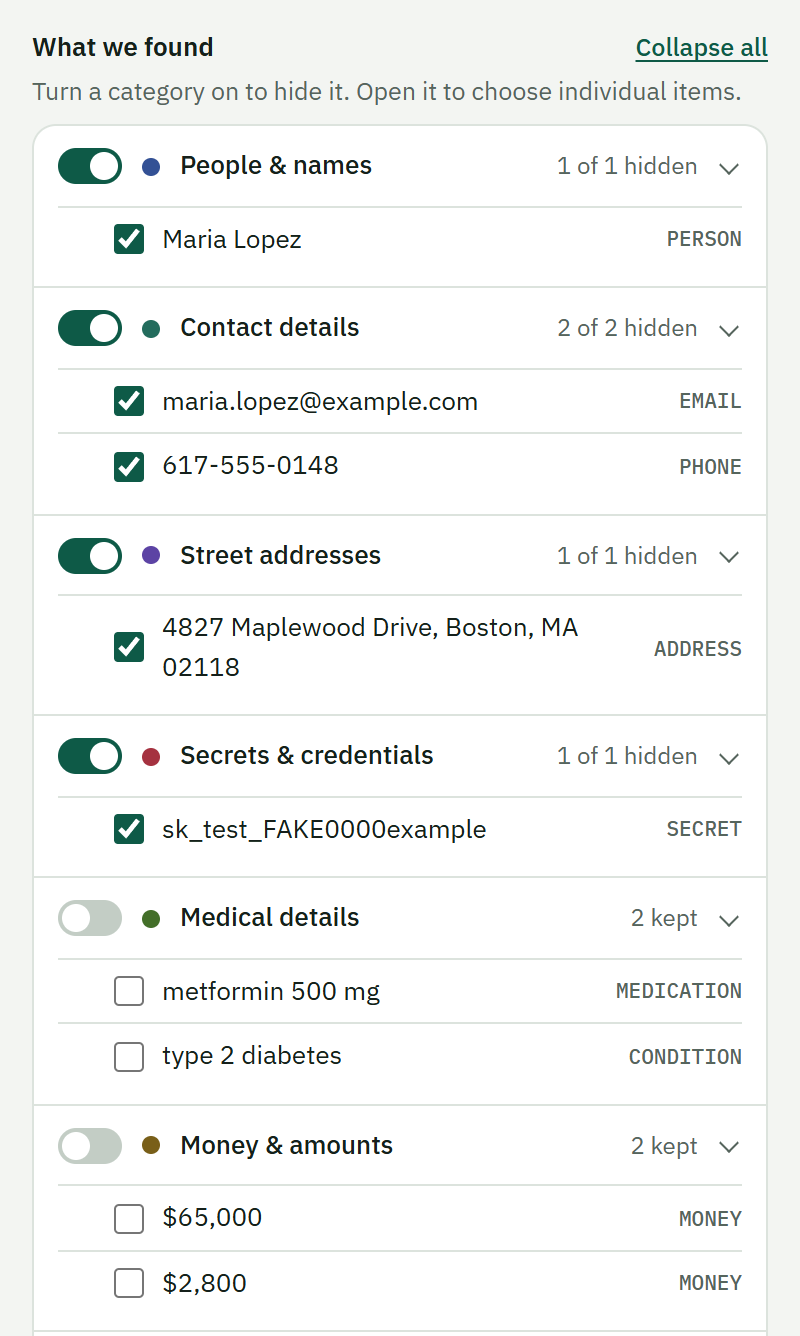
Not everything should be hidden. Ask about a medication or a budget and the AI needs those details to help.
- Names, contacts, IDs, addresses and secrets are hidden by default.
- Medical details, age, amounts and cities stay visible, until you switch them on.
- Every category has a switch, and you can untick single items.
- Choose Strict to hide everything in one click.
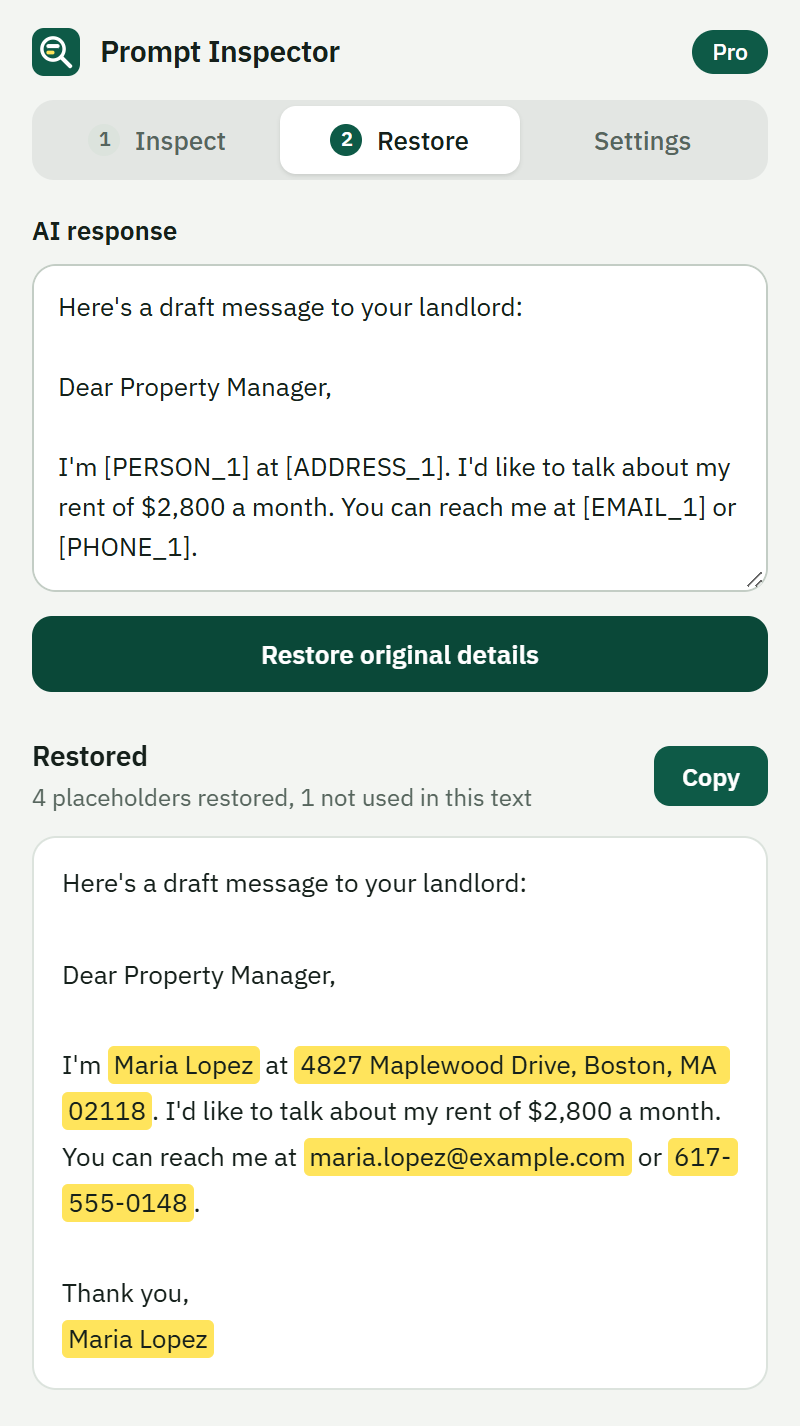
Get your real details back in one click
Paste the AI’s answer into the Restore tab. Every placeholder is swapped back, and restored text is highlighted so you can check it.
- Keeps the AI’s formatting: headings, lists, tables and code.
- Copy it into Word, Docs or Gmail with the formatting intact.
- Tolerates the AI dropping brackets or changing case.
API keys and passwords stay with you
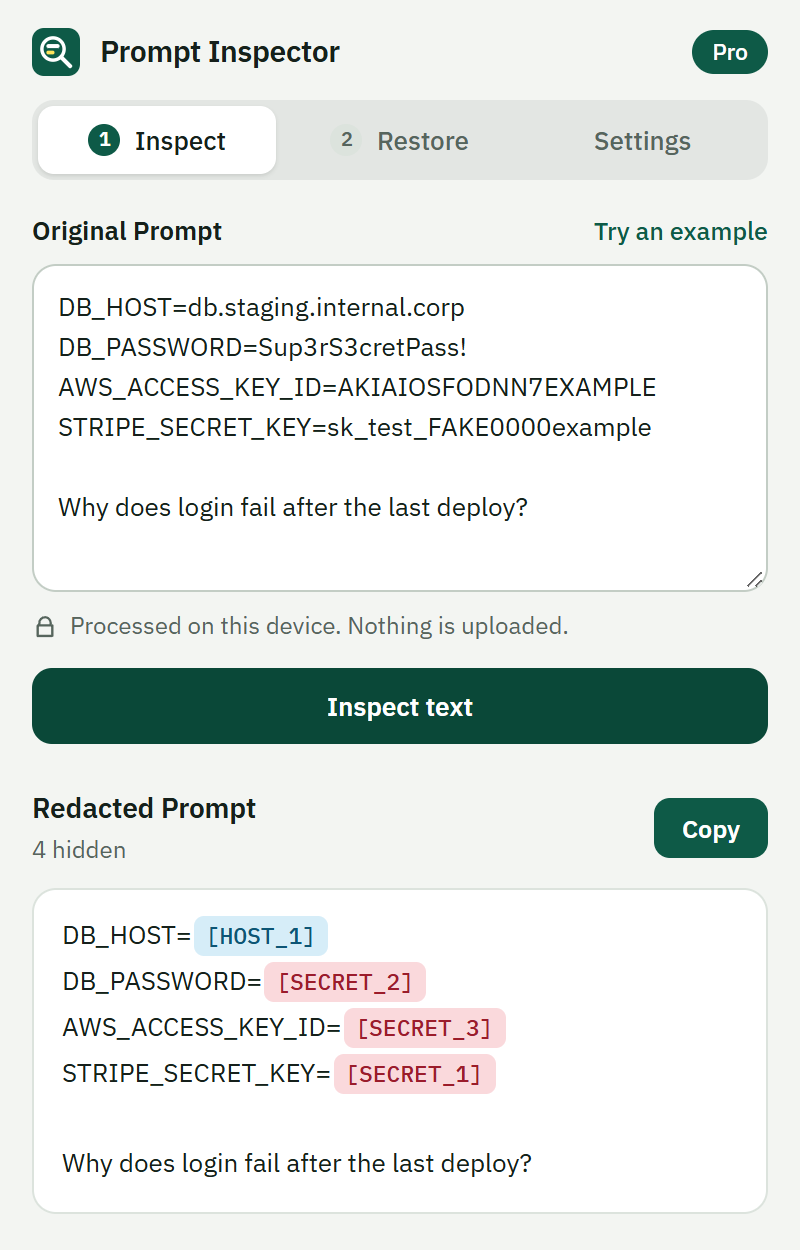
Paste a .env file, a stack trace or a customer record and see exactly what was found before anything leaves your browser.
- Keys, tokens, private keys and connection strings, even inside config files.
- Colour-coded placeholders make the result easy to check at a glance.
- Your own always-hide list for client names and project codenames (Pro).
What it finds
Pattern rules for structured data, plus AI models that run in your browser to recognise names, organizations and places, even in lowercase chat text.
People and names
Full names and short names, in normal or lowercase text.
Contact details
Email addresses and phone numbers in common formats.
Addresses and IDs Pro
Street addresses, dates of birth, account and ID numbers, IBANs, Social Security and card numbers.
Secrets and credentials
API keys, passwords, tokens, private keys, connection strings and sensitive config values.
Servers and config Pro
Internal hostnames, IP addresses and file paths that reveal your setup.
Your own list Pro
Client names, project codenames and internal IDs you want hidden every time.
Medical details Off by default
Medications and conditions. Switch them on when the AI doesn’t need them.
Amounts, age and places Off by default
Kept visible so the AI can reason about them. One switch each to hide them.
Your text never leaves your device
The detection models are packaged inside the extension. There is no account, no analytics and no upload.
Runs offline
Analysis happens in your browser. After install it works without an internet connection.
No access to your sites
It asks for no host permissions, so it can’t read the pages you visit.
Mappings stay in memory
The link between placeholders and your originals is cleared when you close the browser.
Check it yourself: turn off your Wi-Fi and inspect some text. It still works. The only network request the extension ever makes is a one-time license activation for paid keys, and it never includes your text. Read the privacy policy.
Pay once, use it for good
Start free. Upgrade when you need names, addresses and the rest.
Free
- 10 inspections a day
- Emails, phone numbers, card numbers and Social Security numbers
- All secrets and credentials
- Restore with formatting
Pro Lifetime
- Unlimited inspections
- AI detection of names, organizations and places
- Addresses, IDs, IBANs, dates of birth, hosts and IPs
- Medical, money and age categories
- Your always-hide list
- Use it on up to 2 of your devices
- All 1.x updates included
30-day money-back guarantee. Prices in US dollars; taxes are added at checkout where they apply. Payments are handled by Paddle. See the refund policy and terms.
Questions
Is my text sent anywhere?
No. Detection runs in your browser using models bundled with the extension. Your text, the results and the placeholder mappings never reach us or anyone else.
Paid licenses are activated once per device: the extension sends the license key and a random ID it generates, never your text. Details are in the privacy policy.
Which AI tools does it work with?
All of them. You paste your text into Prompt Inspector, copy the cleaned version, and paste that into ChatGPT, Claude, Gemini or anything else. It doesn’t read or change the AI pages themselves.
How accurate is it?
Good, not perfect. Structured data such as emails, phone numbers, cards and keys is caught reliably. Names and places are recognised by AI models and can occasionally be missed or over-matched, which is why you can review and switch single items before you copy. Always check the result for sensitive work. English text works best.
Prompt Inspector reduces what you expose. It does not guarantee compliance with any law or company policy.
What does “lifetime” mean?
You pay once and keep Pro for as long as the product is offered, including all 1.x updates. A future major version (2.0) may be a paid upgrade. The terms have the exact wording.
How many devices can I use it on?
Up to 2. Each device is activated once. To move to a new computer, click “Deactivate this device” in Settings on the old one, or contact support and we’ll reset it.
Which browsers and languages are supported?
Chrome 137 or newer (the side panel and on-device AI need it). Detection works best on English; patterns such as emails, phone numbers and keys work in any language.
What if I’m not happy?
Email us within 30 days of purchase for a full refund. See the refund policy.